collective.tinymcetemplates is a TinyMCE Plugin for templates and snippets. It works with Plone 4.1.3. You can see a "Insert predefined template content" icon added:
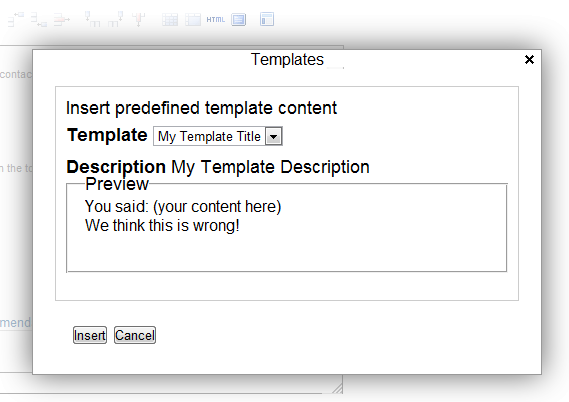
collective.tinymcetemplates is a TinyMCE Plugin for templates and snippets. It works with Plone 4.1.3. You can see a "Insert predefined template content" icon added:
transmogrifier 可以匯入或匯出 Plone 網站的內容,之前的經驗以匯入 CSV 或 PostgreSQL 資料為主,現在完成匯出到 PostgreSQL 的實作。
以 develop.cfg 為例,要修改的內容如下:
eggs +=
    psycopg2
    SQLAlchemy == 0.6.5
    zope.sqlalchemy
    plone.app.transmogrifier
客製 myproj.transmogrifier 的內容摘要如下:
myproj.transmogrifier/configure.zcml

  <transmogrifier:registerConfig
    name="myproj.transmogrifier.exportContent"
    title="MyProject Export Content"
    description="Transmogrifier Pipeline config to export contents."
    configuration="confs/export.cfg"
    />

  <!-- register our blueprints -->
  <utility
    component=".contentexport.ContentExporterSection"
    name="myproj.transmogrifier.contentexporter"
    />

myproj.transmogrifier/browser/configure.zcml

<configure
    xmlns="http://namespaces.zope.org/zope"
    xmlns:browser="http://namespaces.zope.org/browser"
    xmlns:zcml="http://namespaces.zope.org/zcml">

    <browser:page
        for="*"
        class=".contentexport.ContentExport"
        name="content-export"
        permission="cmf.ManagePortal"
        />
<configure>

myproj.transmogrifier/browser/contentexport.py

class ContentExport(BrowserView):

    def __call__(self):
        transmogrifier = ITransmogrifier(self.context)
        transmogrifier('myproj.transmogrifier.exportContent')
        self.request.response.write('exported')

myproj.transmogrifier/confs/export.cfg

[transmogrifier]
pipeline =
    contentexport

[contentexport]
blueprint = myproj.transmogrifier.contentexporter
dsn = postgresql://myuser:mysecret@localhost:5432/mydb
portal-types = News Item, Event
review-states = published
另外,還有 myproj.transmogrifier/models.py 和 myproj.transmogrifier/contentexport.py 兩個主檔,分別負責資料庫連線和匯出工作。
By default, Plone provides a searchbox viewlet and a search portlet. With the viewlet, you can decide whether to search only within the current section. However, the porlet does not apply this behavior. My requirement could be illustrated by this screenshot:

Here are the files to be modified:
$ diff plone/app/portlets/portlets/search.py
55a56,61
>     def folder_path(self):
>         context_state = getMultiAdapter((self.context, self.request),
>                                          name=u'plone_context_state')
>         folder = context_state.folder()
>         return '/'.join(folder.getPhysicalPath())
>

$ diff plone/app/portlets/portlets/search.pt
29a30,44
>
>         <div class="searchSection">
>             <input id="searchbox_currentfolder_only"
>                    class="noborder"
>                    type="hidden"
>                    name="path"
>                    tal:attributes="value view/folder_path"
>                    />
>             <label for="searchbox_currentfolder_only"
>                    i18n:translate="label_searchbox_currentfolder_only"
>                    style="cursor: pointer">
>                 only in current section
>             </label>
>         </div>
>
Here is the default view for Plone.
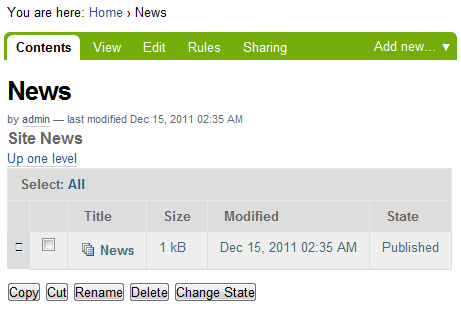
I want Published column instead of Modified column. By 'grep -r listing-table' I find the target file is at plone.app.content/browser/table.pt. Related python files are batching.py, container.py and browser/tavleview.py. My naive guess of changing keyword modified to effective, does not work, showing LocationError.
Here is a customization in plone.app.layout/viewlets/common.py that can display customized logos based on tab paths.
class LogoViewlet(ViewletBase):
    index = ViewPageTemplateFile('logo.pt')

    def update(self):
        super(LogoViewlet, self).update()

        portal = self.portal_state.portal()
        bprops = portal.restrictedTraverse('base_properties', None)
        if bprops is not None:
            logoName = bprops.logoName
        else:
            logoName = 'logo.jpg'
        plone_url = getToolByName(self.context, 'portal_url')()
        plone_url_len = len(plone_url)
        request = self.request
        url = request['URL']
        path = url[plone_url_len:]
        if path.startswith('/news'):
            logoName = 'logo-news.png'
        if path.startswith('/events'):
            logoName = 'logo-events.png'
To illustrate how the path variable works, add a Python Script in ZMI and use the following sample code:
from Products.CMFCore.utils import getToolByName

plone_url = getToolByName(context, 'portal_url')()
print "plone_url = %s\n" % (plone_url),
plone_url_len = len(plone_url)
request = context.REQUEST
url = request['URL']
path = url[plone_url_len:]
print "url = %s, path = %s" % (url, path)
return printed
portal_tab, or globalnav, or global_section in Plone, provides clickable links. Let's say, we want a tab to open in new browser window when clicked. The trick is in plone.app.layout/viewlets/sections.pt.
<ul id="portal-globalnav"
    tal:define="selected_tab python:view.selected_portal_tab"
    ><tal:tabs tal:repeat="tab portal_tabs"
    ><li tal:define="tid tab/id;
                     turl tab/url"
         tal:attributes="id string:portaltab-${tid};
                        class python:selected_tab==tid and 'selected' or 'plain'"
        ><a href=""
           tal:content="tab/name"
           tal:attributes="href tab/url;
                           title tab/description|nothing;
                           target python: (turl.endswith('/my-url') and '_blank' or '')">
        Tab Name
        </a></li></tal:tabs></ul>
collective.edm.listing provides a custom view for folder. It works with Plone Quick Upload to upload new files.


